July 14, 2026
Video Composer: cut it where you made it
A multi-track timeline for the clips you just generated, with playback and export that both run in your browser.

Generating clips is half of a film. The other half is the timeline, and we didn't want you exporting a folder of mp4s and finishing the job somewhere else.
Tracks, clips and the ordinary edits
Video, image, text and audio tracks stack front to back the way they do in every other editor, with the topmost track nearest the viewer. Clips move, trim from either end, split at the playhead and delete, and the controls sit on the clip itself instead of hiding in a menu.
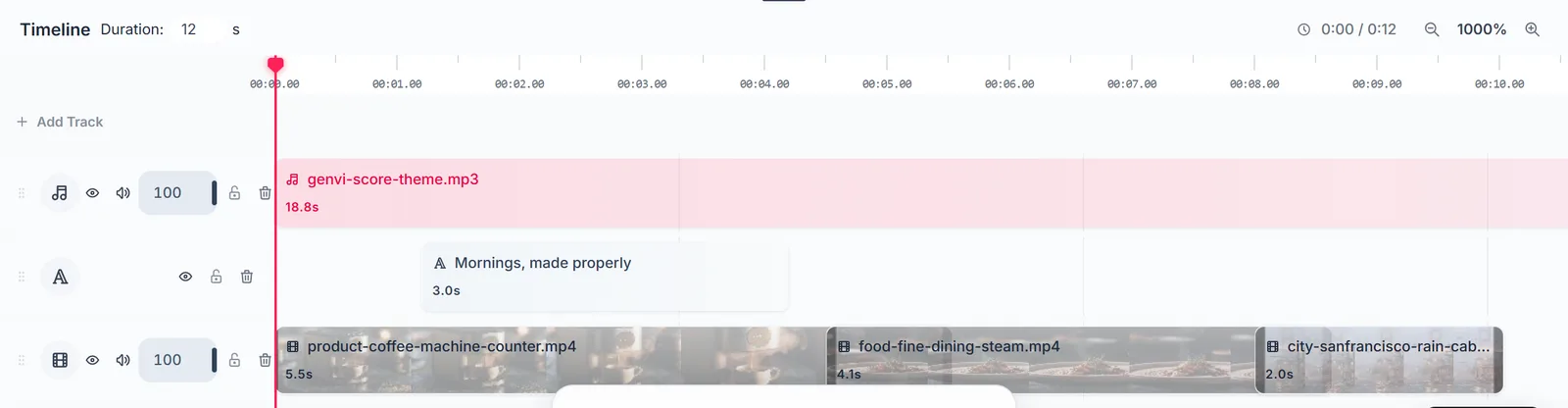
Trim to the music instead of to the clip lengths and the whole thing immediately feels deliberate.
Playback tells you the truth
The preview composites real media at real time, so it isn't an approximation of a render you'll see later. Playback and export share one model of the timeline, which means what you scrub is what you get. Both stop at the end of your last clip too, not at some padded duration with dead frames hanging off the end.
Export runs on your machine
There's no render queue, because encoding happens right there in the tab. That's why export starts the moment you ask, and why we don't meter it. Pick your resolution, aspect ratio and format, and the container follows whatever can be muxed reliably in a browser.
We wrote up the engineering behind that on the dev blog, including the trade-offs we accepted to keep it local.