October 13, 2026
Use genvi from Claude, ChatGPT, Cursor and the terminal
Connect genvi to Claude, ChatGPT, Cursor or your terminal with a personal key. Same models and prices as the genvi website.
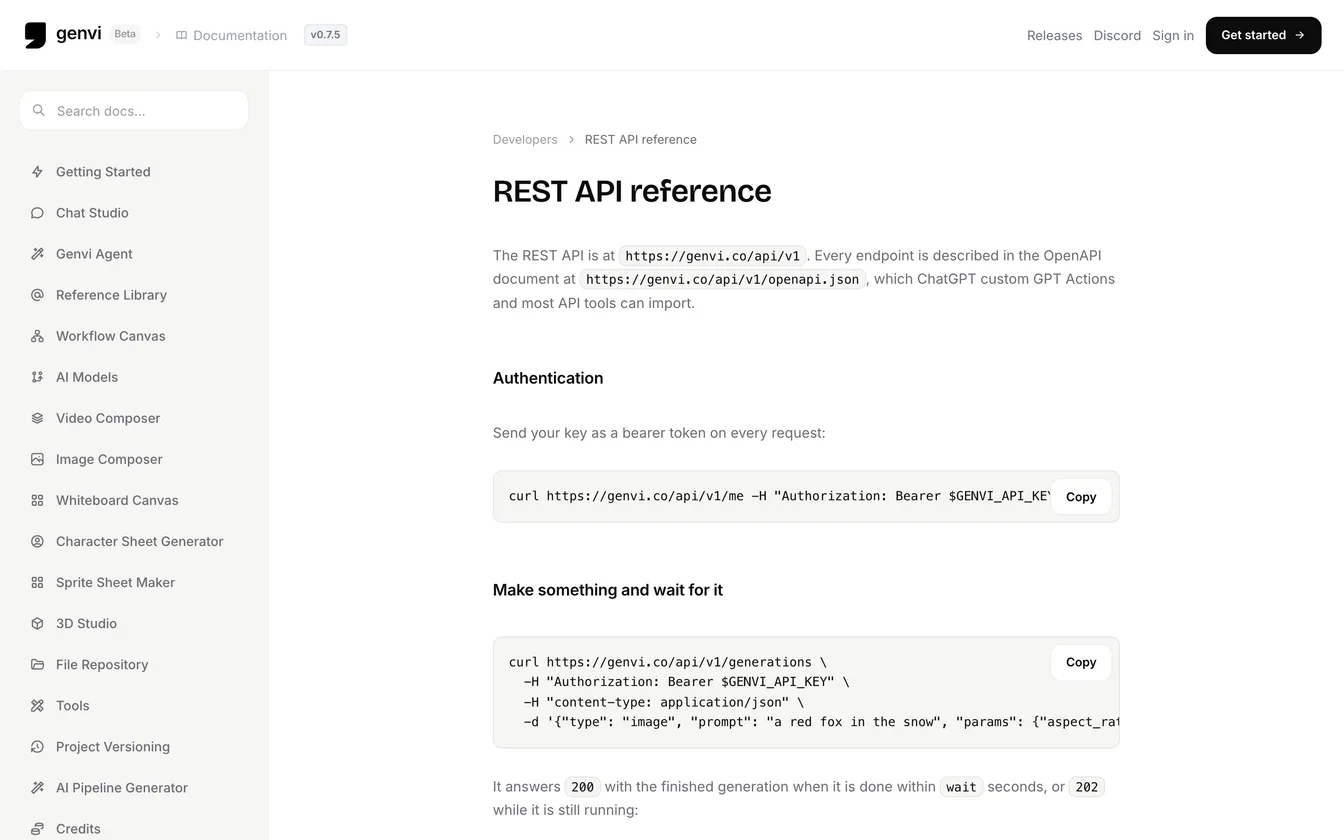
You can now use genvi from Claude, ChatGPT, Cursor, VS Code and the terminal, or from your own code. You make a personal key, which is a password that lets another app use your genvi account. Everything uses the same models and prices as genvi.co, and spends the credits of the account the key belongs to.
Use genvi from Claude, ChatGPT and Cursor: three ways in
- MCP server at
https://genvi.co/api/v1/mcp, for AI assistants and coding tools. MCP is a standard way for assistants to use outside tools. The assistant can make things, check a result, list models, estimate a cost and read your balance. - Developer API at
https://genvi.co/api/v1, for your own code. An API lets one program talk to another. It comes with a description of itself at/api/v1/openapi.json. - The genvi command-line tool, a program you type commands into. It suits the terminal and assistants that can only start a local program.
genvi mcpconnects it to the same server.
Make a key and connect
- Open your Account page and find API keys.
- Type a name you will recognise, such as "Claude Code on my laptop", and choose how long the key lasts.
- Choose Create key and copy it. genvi shows it only once. A key starts with
gvk_. - Add it to your tool. For Claude Code, run
claude mcp add --transport http genvi https://genvi.co/api/v1/mcp --header "Authorization: Bearer gvk_...". Cursor, VS Code, opencode, Gemini CLI, Codex CLI, Claude Desktop and the Claude API each have a snippet in the docs. ChatGPT can use the API description as a custom GPT Action.
Then ask in plain words, such as "how much would a 10 second genvi video cost?".
What an assistant can do
| Tool | What it does |
|---|---|
| genvi_generate | Makes an image, video, voice-over, sound, music, text or 3D model, waiting up to 50 seconds for it |
| genvi_get_generation | Shows the status of a generation and its result files |
| genvi_cancel_generation | Stops a run and refunds it |
| genvi_list_models | Lists every model, its price in credits and its settings |
| genvi_estimate_cost | Tells you what a run will cost, priced as it will be charged |
| genvi_account | Shows your plan and credit balance |
| genvi_list_projects | Lists your projects |
Later the same day we added more tools. They cover a model's full settings, your reference library (so a saved character can be called with
@handle), recipes and a planner. The planner turns a brief into a checked, priced plan of steps. genvi ask and genvi recipe show you the plan and its total and ask before anything runs. If there is no terminal to ask in, they start nothing unless you add --yes. Recipes are fixed workflows, such as image to video.
Made with Grok Imagine 2.0 from a prompt for a red fox curled up in snow at dawn. The CLI example in the docs asks for the same subject: genvi image "a red fox in the snow" --param aspect_ratio=16:9.
From the terminal
Run
genvi login and paste a key. Then genvi image "a red fox in the snow" --out ./renders makes a picture and downloads it. genvi models --type video lists models with prices. genvi estimate video --model <id> --param duration=10 shows the price of a run first. Add --json if you want output that other programs can read. genvi mcp can also send a result into Blender, Unity or Unreal Engine through the Genvi Bridge add-on.Keys are limited on purpose
A key can do what you can do, and no more. It cannot change your account, billing or other keys. A new key starts with permission to generate, a limit of 500 credits a day and a 90 day life. The Account page shows where each key was last used. You can swap a key for a new one. The old key can keep working for 0, 1, 24 or 168 hours, or you can cancel all your keys at once. We wrote about the design in API keys that act as their owner.
What it costs
There is no separate price for the API. Each run costs what it costs in the app, and the cost checks (
genvi_estimate_cost in an assistant, genvi estimate in the terminal) tell you first. A request that would overspend is refused with a message saying so.